
RSyslog Queues: Principles of Operation and Configuration Using NGINX Event Forwarding as an Example
General information.
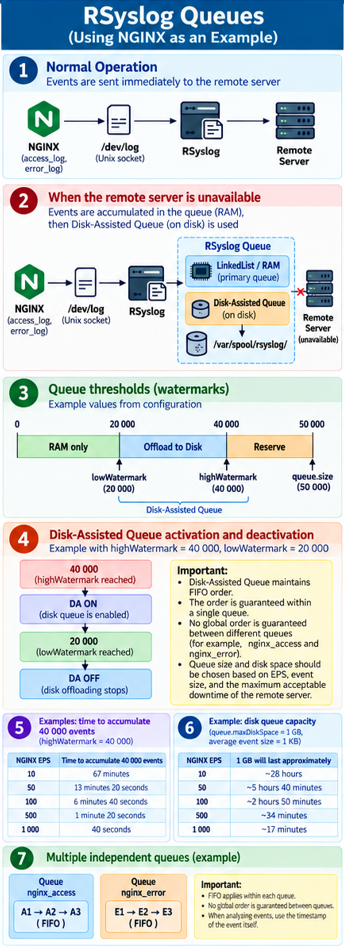
When forwarding logs to a remote server, you must account for the possibility that the server may be temporarily unavailable. To reduce the risk of losing events, RSyslog supports a queue mechanism.
In the example considered, Nginx sends events locally to RSyslog via a Unix socket /dev/log, after which RSyslog sends them to a remote server.
Delivery scheme:
Nginx → /dev/log → RSyslog → queue → remote server.
Note. One of the options for sending Nginx events to a remote server is shown.
Forwarding events from Nginx.
In the Nginx configuration, sending events to the local RSyslog can be set up as follows:
   access_log syslog:server=unix:/dev/log,facility=local3,tag=nginx_access,severity=info combined;
   error_log  syslog:server=unix:/dev/log,facility=local3,tag=nginx_error warn;
Where:
access_log— Nginx directive for configuring HTTP request logging; in this case it defines forwarding Access events to Syslog;error_log— Nginx directive for configuring the error log; in this case it defines forwarding Error events to Syslog;syslog:— instructs Nginx to use Syslog as the destination for the log instead of a regular file;server=unix:/dev/log— defines the address of the Syslog server, the valueunix:/dev/logindicates sending messages to the local Syslog service via the Unix socket/dev/log;unix:— indicates that a local Unix domain socket is used for delivery rather than a network TCP/UDP connection;/dev/log— the standard Unix socket through which applications send Syslog messages to the local logging service, in this case RSyslog;facility=local3— sets the Syslog facilitylocal3, which allows events to be classified and can be used by RSyslog for filtering and routing;tag=nginx_access— sets the Syslog tag foraccess_log, allowing them to be identified in RSyslog;tag=nginx_error— sets the Syslog tag forerror_log;severity=info— sets the Syslog severityinfofor messagesaccess_log;combined— the name of the formataccess_log;warn— the minimum Nginx error level that will be forwarded via the specified "" directive;error_log.
NOTE.
The Unix socket
/dev/logis used only for local delivery of messages to RSyslog and is not a disk-based queue or event storage file.The parameters
severity=infoandwarnperform different functions.severity=infoinaccess_logsets the Syslog severity of the sent message, whereaswarninerror_logdefines the minimum level of NGINX errors that must be logged.
RSyslog queue.
A queue can be used to send events to a remote server, Disk-Assisted below is an example of two parameters of two queues for access_log and error_log in the RSyslog configuration file in the directory /etc/rsyslog.d/:
    action(
		...
        queue.type="LinkedList"
        queue.filename="nginx_access"
        queue.size="50000"
        queue.highWatermark="40000"
        queue.lowWatermark="20000"
        queue.maxdiskspace="1g"
        queue.saveonshutdown="on"
        action.resumeRetryCount="-1"
        action.resumeInterval="5"
    )

   ...

       action(
		...
        queue.type="LinkedList"
        queue.filename="nginx_error"
        queue.size="20000"
        queue.highWatermark="16000"
        queue.lowWatermark="8000"
        queue.maxdiskspace="512m"
        queue.saveonshutdown="on"
        action.resumeRetryCount="-1"
        action.resumeInterval="5"
    )
Main parameters.
queue.type— the main queue of typeLinkedList, operating primarily in memory;queue.filename— sets the name of the disk-part files and allows using Disk-Assisted Queue;queue.size— maximum size of the main queue (50,000 messages);queue.highWatermark— activation threshold of theDisk-Assistedmechanism;queue.lowWatermark— lower unloading threshold of the main queue;queue.maxDiskSpace— maximum volume of the disk portion of the queue;queue.saveOnShutdown— preservation of queue messages on normal shutdown of RSyslog;action.resumeRetryCount— unlimited number of resend recovery attempts when the value is "-1";action.resumeInterval— base interval for retrying recovery actions (in seconds).
Queue operation.
When the remote server is normally available, no queue is formed for events.
If the remote server becomes unavailable, messages begin to accumulate in the RSyslog main queue (RAM or memory queue).
When queue.highWatermark="40000" is reached, the Disk-Assisted mechanism is activated, and RSyslog begins to use the disk portion of the queue (writing to a file in the directory /var/spool/rsyslog).
The difference between queue.size="50000" and queue.highWatermark="40000" is 10,000 messages (emergency buffer). This buffer allows the main queue to continue accepting events, including during short spikes in load, while the mechanism transfers messages to the disk queue.
The queue.lowWatermark="20000" parameter defines the lower unloading threshold of the main queue and helps avoid too frequent toggling of the Disk-Assisted mechanism.
After the remote server becomes available again, RSyslog continues transmitting the accumulated events.
Disk space limitation.
The parameter queue.maxDiskSpace="1g" limits the maximum size of the queue disk portion to 1 GiB.
The queue size should be chosen taking into account:
- events per second (EPS);
- average event size;
- available disk space;
- possible load spikes;
- the maximum allowable downtime of the remote server.
IMPORTANT!
Disk-Assisted Queueis intended for temporary buffering of events and does not replace monitoring of free disk space. You must monitor the fill level of the partition containing RSyslog's working directory, as well as the size of local Nginx logs.
Order of processing events in the queue.
Within a single queue, RSyslog processes events according to the FIFO (First In, First Out) principle — events that entered the queue earlier are processed before later events.
Reaching queue.highWatermark and activation of the Disk-Assisted Queue should not change the logical order of event processing. The disk portion is a continuation of the queue mechanism and is used for temporary storage of accumulated messages.
After the remote server becomes available again, the accumulated events continue to be processed in queue order.
Multiple independent queues.
Keep in mind that FIFO is applied within a specific queue, not to all RSyslog events as a whole. For example, in the considered Nginx configuration two independent queues are used: for access_log and for error_log. The overall sequence between the two independent queues is not guaranteed. Each queue has its own processing mechanism, state, buffering and sending.
IMPORTANT! When analyzing event order you should rely on the event's own timestamp.
FIFOensures ordering inside a single queue, but does not form a single global sequence across multiple independent RSyslog queues.
Summary information.
Practical example.
The remote server is unavailable. Restart the RSyslog service and check the status:
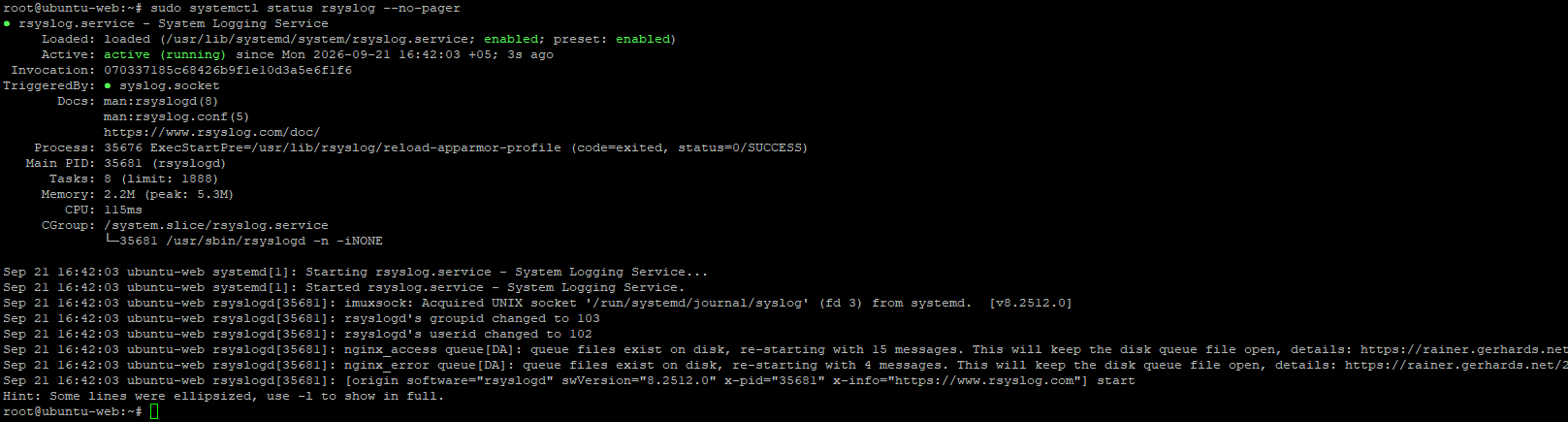
In the screenshot RSyslog is running successfully, but there are important messages about disk queues:
nginx_access queue[DA]: queue files exist on disk, re-starting with 15 messages.
This will keep the disk queue file open

nginx_error queue[DA]: queue files exist on disk, re-starting with 4 messages.
This will keep the disk queue file open
This means that during previous operation RSyslog left unprocessed events in the disk queue:
nginx_access— 15 events;nginx_error— 4 events.
Contents of the directory /var/spool/rsyslog:
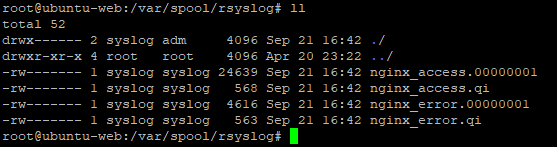
Examples of event records in the file nginx_access.00000001:
<Obj:1:msg:1:
+iProtocolVersion:2:1:0:
+iSeverity:2:1:6:
+iFacility:2:2:19:
+msgFlags:2:2:36:
+ttGenTime:2:10:1789990825:
+tRcvdAt:3:34:2:2026:9:21:16:40:25:85085:6:+:5:0:
+tTIMESTAMP:3:34:2:2026:9:21:16:40:25:85085:6:+:5:0:
+pszTAG:1:10:ubuntu-web:
+pszRawMsg:1:680:<158>Sep 21 16:40:25 ubuntu-web nginx_access: LEEF:1.0|NGINX|NGINX|1.28.3|200|devTime=21/Sep/2026:16:40:25 +0500#011devTimeFormat=dd/MMM/yyyy:HH:mm:ss Z#011src=192.168.0.146#011dst=192.168.0.219#011dstPort=443#011proto=HTTP/2.0#011usrName=-#011request=GET /account/login/?next=/studies/use-cases/ HTTP/2.0#011body_bytes_sent=2924#011http_referer=https://192.168.0.219/account/roles/#011http_true_client_ip=-#011http_user_agent=Mozilla/5.0 (Windows NT 10.0; Win64; x64; rv:156.0) Gecko/20100101 Firefox/156.0#011http_x_header=-#011http_x_forwarded_for=-#011request_time=0.022#011upstream_response_time=0.022#011pipe=.#011uri_query=next=/studies/use-cases/#011uri_path=/account/login/#011:
+pszInputName:1:8:imuxsock:
+pszRcvFrom:1:10:ubuntu-web:
+pszRcvFromIP:1:9:127.0.0.1:
+localvars:1:642:{ "nginx_leef": "LEEF:1.0|NGINX|NGINX|1.28.3|200|devTime=21\/Sep\/2026:16:40:25 +0500\tdevTimeFormat=dd\/MMM\/yyyy:HH:mm:ss Z\tsrc=192.168.0.146\tdst=192.168.0.219\tdstPort=443\tproto=HTTP\/2.0\tusrName=-\trequest=GET \/account\/login\/?next=\/studies\/use-cases\/ HTTP\/2.0\tbody_bytes_sent=2924\thttp_referer=https:\/\/192.168.0.219\/account\/roles\/\thttp_true_client_ip=-\thttp_user_agent=Mozilla\/5.0 (Windows NT 10.0; Win64; x64; rv:156.0) Gecko\/20100101 Firefox\/156.0\thttp_x_header=-\thttp_x_forwarded_for=-\trequest_time=0.022\tupstream_response_time=0.022\tpipe=.\turi_query=next=\/studies\/use-cases\/\turi_path=\/account\/login\/\t" }:
+offMSG:2:2:31:
>End
.
<Obj:1:msg:1:
+iProtocolVersion:2:1:0:
+iSeverity:2:1:6:
+iFacility:2:2:19:
+msgFlags:2:2:36:
+ttGenTime:2:10:1789990826:
+tRcvdAt:3:35:2:2026:9:21:16:40:26:911130:6:+:5:0:
+tTIMESTAMP:3:35:2:2026:9:21:16:40:26:911130:6:+:5:0:
+pszTAG:1:10:ubuntu-web:
+pszRawMsg:1:655:<158>Sep 21 16:40:26 ubuntu-web nginx_access: LEEF:1.0|NGINX|NGINX|1.28.3|302|devTime=21/Sep/2026:16:40:26 +0500#011devTimeFormat=dd/MMM/yyyy:HH:mm:ss Z#011src=192.168.0.146#011dst=192.168.0.219#011dstPort=443#011proto=HTTP/2.0#011usrName=-#011request=POST /account/login/ HTTP/2.0#011body_bytes_sent=0#011http_referer=https://192.168.0.219/account/login/?next=/studies/use-cases/#011http_true_client_ip=-#011http_user_agent=Mozilla/5.0 (Windows NT 10.0; Win64; x64; rv:156.0) Gecko/20100101 Firefox/156.0#011http_x_header=-#011http_x_forwarded_for=-#011request_time=0.252#011upstream_response_time=0.252#011pipe=.#011uri_query=-#011uri_path=/account/login/#011:
+pszInputName:1:8:imuxsock:
+pszRcvFrom:1:10:ubuntu-web:
+pszRcvFromIP:1:9:127.0.0.1:
+localvars:1:614:{ "nginx_leef": "LEEF:1.0|NGINX|NGINX|1.28.3|302|devTime=21\/Sep\/2026:16:40:26 +0500\tdevTimeFormat=dd\/MMM\/yyyy:HH:mm:ss Z\tsrc=192.168.0.146\tdst=192.168.0.219\tdstPort=443\tproto=HTTP\/2.0\tusrName=-\trequest=POST \/account\/login\/ HTTP\/2.0\tbody_bytes_sent=0\thttp_referer=https:\/\/192.168.0.219\/account\/login\/?next=\/studies\/use-cases\/\thttp_true_client_ip=-\thttp_user_agent=Mozilla\/5.0 (Windows NT 10.0; Win64; x64; rv:156.0) Gecko\/20100101 Firefox\/156.0\thttp_x_header=-\thttp_x_forwarded_for=-\trequest_time=0.252\tupstream_response_time=0.252\tpipe=.\turi_query=-\turi_path=\/account\/login\/\t" }:
+offMSG:2:2:31:
>End
.
Note. In the file nginx_access.00000001 events are sent in the format
LEEF.
Examples of event entries in the file nginx_access.00000001:
<Obj:1:msg:1:
+iProtocolVersion:2:1:0:
+iSeverity:2:1:3:
+iFacility:2:2:19:
+msgFlags:2:2:36:
+ttGenTime:2:10:1789990902:
+tRcvdAt:3:35:2:2026:9:21:16:41:42:581529:6:+:5:0:
+tTIMESTAMP:3:35:2:2026:9:21:16:41:42:581529:6:+:5:0:
+pszTAG:1:10:ubuntu-web:
+pszRawMsg:1:377:<155>Sep 21 16:41:42 ubuntu-web nginx_error: 2026/09/21 16:41:42 [error] 35655#35655: *1 connect() failed (111: Connection refused) while connecting to upstream, client: 192.168.0.146, server: 192.168.0.219, request: "GET /account/groups/ HTTP/2.0", upstream: "http://127.0.0.1:8001/account/groups/", host: "192.168.0.219", referrer: "https://192.168.0.219/app/insight/events/catalog/":
+pszInputName:1:8:imuxsock:
+pszRcvFrom:1:10:ubuntu-web:
+pszRcvFromIP:1:9:127.0.0.1:
+localvars:1:379:{ "nginx_error": "2026\/09\/21 16:41:42 [error] 35655#35655: *1 connect() failed (111: Connection refused) while connecting to upstream, client: 192.168.0.146, server: 192.168.0.219, request: \"GET \/account\/groups\/ HTTP\/2.0\", upstream: \"http:\/\/127.0.0.1:8001\/account\/groups\/\", host: \"192.168.0.219\", referrer: \"https:\/\/192.168.0.219\/app\/insight\/events\/catalog\/\"" }:
+offMSG:2:2:31:
>End
.
<Obj:1:msg:1:
+iProtocolVersion:2:1:0:
+iSeverity:2:1:3:
+iFacility:2:2:19:
+msgFlags:2:2:36:
+ttGenTime:2:10:1789990904:
+tRcvdAt:3:35:2:2026:9:21:16:41:44:554737:6:+:5:0:
+tTIMESTAMP:3:35:2:2026:9:21:16:41:44:554737:6:+:5:0:
+pszTAG:1:10:ubuntu-web:
+pszRawMsg:1:377:<155>Sep 21 16:41:44 ubuntu-web nginx_error: 2026/09/21 16:41:44 [error] 35655#35655: *1 connect() failed (111: Connection refused) while connecting to upstream, client: 192.168.0.146, server: 192.168.0.219, request: "GET /account/groups/ HTTP/2.0", upstream: "http://127.0.0.1:8001/account/groups/", host: "192.168.0.219", referrer: "https://192.168.0.219/app/insight/events/catalog/":
+pszInputName:1:8:imuxsock:
+pszRcvFrom:1:10:ubuntu-web:
+pszRcvFromIP:1:9:127.0.0.1:
+localvars:1:379:{ "nginx_error": "2026\/09\/21 16:41:44 [error] 35655#35655: *1 connect() failed (111: Connection refused) while connecting to upstream, client: 192.168.0.146, server: 192.168.0.219, request: \"GET \/account\/groups\/ HTTP\/2.0\", upstream: \"http:\/\/127.0.0.1:8001\/account\/groups\/\", host: \"192.168.0.219\", referrer: \"https:\/\/192.168.0.219\/app\/insight\/events\/catalog\/\"" }:
+offMSG:2:2:31:
>End
.
Note. After restoring availability of the remote server, queue files in the directory
/var/spool/rsyslog/may not be removed immediately. The presence of these files by itself does not mean that unsent events remain in the queue. Service filesDisk-Assisted Queuemay be retained after the queue is emptied and can be removed, in particular, upon a subsequent restart of the RSyslog service.