
Basic description and architecture of auditd
1. Architecture overview.
Linux Audit is an audit subsystem built into the Linux kernel, designed to record events related to the security of the operating system. It allows tracking of user and process actions, file accesses, execution of system calls, configuration changes, use of privileges, and other significant operations.
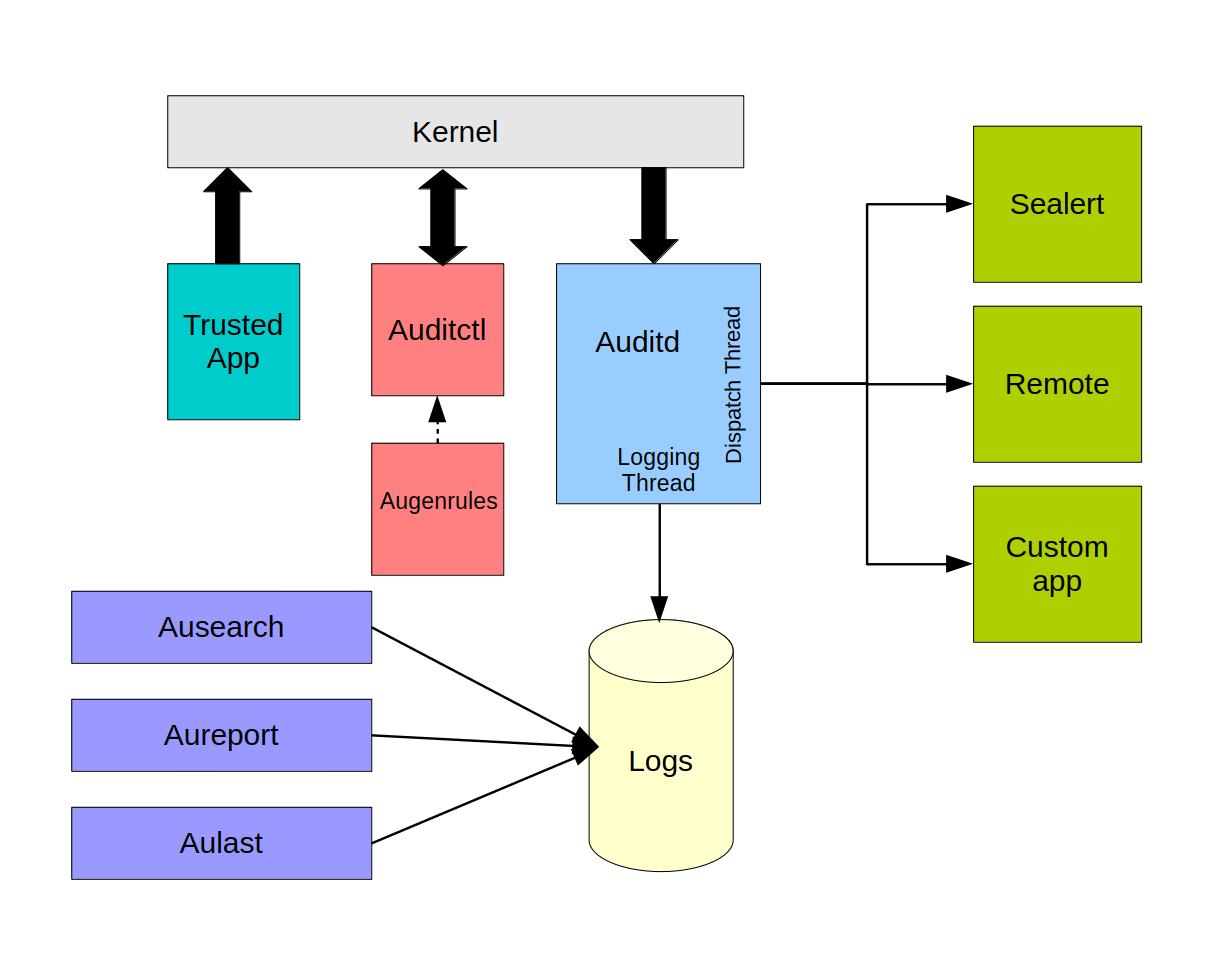
The central component of the subsystem is the daemon auditd. It receives events from the Linux kernel via the audit interface, processes them and stores them in a log, which by default is located in /var/log/audit/audit.logIn addition, events can be forwarded to other applications or to remote collection and analysis systems, for example to SIEM.
Main components of Linux Audit:
- Linux kernel audit subsystem — generates events;
auditd— receives events and writes them to the log;auditctl— is used to manage audit parameters and loaded rules;augenrules— combines rules from the directory/etc/audit/rules.d/and loads them into the audit subsystem;ausearch— performs searches for events in audit logs;aureport— generates summary reports;- event dispatcher plugins — provide additional processing and forwarding of events to external systems.
The general event processing flow looks as follows:
- a user, process, or trusted application performs an action in the operating system.
- the Linux kernel checks the action against the loaded audit rules.
- when the rule conditions are met, the kernel generates an audit event.
- The event is augmented with execution context: user and process identifiers, timestamp, result of the operation, and other details.
- the event is placed into the kernel's internal queue —
backlog. - daemon
auditdreceives the event from the queue. - the event is written to the audit log and, if necessary, forwarded to connected plugins.
1.1. Runtime dependencies.
For operation of auditd the following components are required:
coreutils;initscripts-service— recommended but not mandatory;- Linux kernel version
5.15or newer; systemd.
Note. Although the implementation under consideration provides for the use of
systemdto start the audit daemon, other init systems may be used. For example, Alpine Linux uses an init script forOpenRC.
1.2. Loading audit rules.
Audit rules are loaded from user space into the kernel audit subsystem using auditctl.
The utility auditctl allows:
- to create and load rules;
- to view active rules;
- to delete individual rules;
- to clear the rule set;
- to configure the queue size
backlog; - to define system behavior on critical errors;
- to get the current state of the audit subsystem.
For Audit 3.x, rules from separate files are typically combined and loaded by the program augenrulesAs a rule, the source files are placed in the directory:
/etc/audit/rules.d/The command augenrules processes files with the extension .rulescombines them in name-sorted order and produces the final file:
/etc/audit/audit.rulesStarting with Audit 4.x, a service is provided for managing rule loading:
audit-rules.serviceIt is managed via systemctl and also uses auditctl to pass rules to the kernel.
Note. The specific mechanism for loading rules, file locations and service names may differ depending on the Linux distribution and the version of the Audit package. Before configuring, it is necessary to check the actual configuration of the installed system.
1.3. Generation of events by trusted applications.
Not all audit events occur solely as a result of system call rule triggers. Some trusted applications independently send messages to the audit subsystem.
Such applications include, for example, components shadow-utils, used for managing local users and groups.
When such a message is received, the kernel adds information about the event source, a timestamp and other contextual information, after which it places the event in the queue for delivery to the daemon auditd.
Thus, sources of Linux Audit events can be:
- system call audit rules;
- file and directory watch rules;
- Linux kernel subsystems;
- authentication mechanisms;
- trusted applications;
- services that use the Linux Audit interface.
2. Features of the auditd daemon's operation.
When configuring auditd it is necessary to take into account disk space filling, features of protecting the service via systemd, as well as the correct order of starting, stopping, and restarting the daemon.
space_left_action
admin_space_left_action
systemd-analyze security auditd.servicesystemctl daemon-reload
systemctl status auditd
auditctl -s
auditctl -lПользователь → systemctl → D-Bus → systemd → auditdauid=4294967295auid=-1RefuseManualStop=yessystemctl stop auditdservice auditd restart
service auditd reload
service auditd rotate
service auditd resume
service auditd state/usr/libexec/initscripts/legacy-actions/auditctl <SIGNAL>find /usr/libexec/initscripts/legacy-actions/ -maxdepth 2 -type f
service auditd status10 - Конфигурация ядра и auditctl
20 - Правила, которые могли бы соответствовать общим правилам,
но для которых требуется другое соответствие (override)
30 - Основные правила
40 - Необязательные правила
50 - Правила, специфичные для сервера
70 - Локальные системные правила
90 - Завершение настройки (immutable)10-base_description.rules
20-exceptions.rules
25-denied.rules
30-base_rules.rules
40-extended_rules.rules
45-containers.rules
50-web-servers.rules
55-databases.rules
60-middleware.rules
65-monitoring.rules
70-devops.rules
75-network-services.rules
80-virtualization.rules
90-custom.rules
99-finalize.rules###############################################################################
# БАЗОВАЯ КОНФИГУРАЦИЯ
###############################################################################
# Удалить все ранее загруженные правила (должно быть ПЕРВОЙ директивой).
-D
# Размер очереди событий ядра.
# Увеличено до 32768: набор включает аудит execve для всех
# атрибутируемых процессов, при всплесках 8192 приводит к сообщениям
# "audit: backlog limit exceeded" и БЕЗВОЗВРАТНОЙ потере событий.
# при включении логирования при загрузке ОС, 8192 не хватало
-b 32768
# Реакция на сбой подсистемы аудита: 1 = сообщение в kernel log.
-f 1
# КРИТИЧНО. Продолжать обработку файла при ошибке в отдельном правиле.
# Без этой директивы auditctl ПРЕКРАЩАЕТ обработку файла на первой ошибке,
# и все последующие правила молча не применяются.
# Ошибку вызывает watch на отсутствующий КАТАЛОГ (watch на отсутствующий файл
# ошибкой не является). В гетерогенном парке такие каталоги неизбежны.
# ОБЯЗАТЕЛЬНОЕ ДОПОЛНЕНИЕ: -i маскирует ошибки, поэтому после установки
# ОБЯЗАТЕЛЬНО выполняется проверка полноты загрузки активных правил.
-i
# Время ожидания при переполнении очереди. По умолчанию задача блокируется,
# что при всплеске может подтормаживать нагруженный сервер.
# Значение 0 = не ждать (события отбрасываются вместо блокировки).
# Включать ТОЛЬКО вместе с мониторингом счётчика lost
# и по результатам пилота.
#--backlog_wait_time 0
# в centos 10 по-умолчанию 60000###############################################################################
# Linux Audit Policy — ИСКЛЮЧЕНИЯ
#
# Назначение : безопасное снижение избыточных служебных событий.
# Размещение : /etc/audit/rules.d/20-exceptions.rules (root:root, 640)
#
# ВАЖНО:
# Исключения допускаются ТОЛЬКО если они не создают слепых зон
# по субъекту или контексту выполнения. Исключения вида
# "-a never,exit -F subj_type=crond_t" или "-F exe=<путь>" ЗАПРЕЩЕНЫ:
# они полностью выключают аудит для целого класса процессов.
#
# EPS: правило снижает объём событий; новых событий не создаёт.
###############################################################################
# Подавление парных служебных записей о конце события.
# Данные не теряются, объём снижается.
-a always,exclude -F msgtype=EOE
# ЗАПРЕЩЕНО исключать msgtype=CWD — теряется рабочий каталог процесса,
# относительные пути становятся неинтерпретируемыми.
# ЗАПРЕЩЕНО исключать msgtype=AVC — теряются срабатывания SELinux.###############################################################################
# Linux Audit Policy — ФИНАЛИЗАЦИЯ
#
# -e 1 — аудит включён, правила изменяемы (требуется для штатной эксплуатации).
# -e 2 — правила неизменяемы до перезагрузки; если этот режим утверждён,
# директива задаётся здесь и применяется ПОСЛЕДНЕЙ.
#
# ВАЖНО: изменение -e 1 на -e 2 меняет эксплуатационный режим и выполняется
# только после проверки совместимости с обновлением и сопровождением системы.
# EPS: не генерирует дополнительный поток событий.
###############################################################################
-e 1augenrules --check
augenrules --load
auditctl -l
auditctl -s-e 2type=<something> msg=audit(1679598373.352:1256072):type=<something>msg=audit(1679598373.352:1256072)1679598373.352:1256072key=valuetype=SYSCALL msg=audit(1679598373.352:1256072):
type=EXECVE msg=audit(1679598373.352:1256072):
type=CWD msg=audit(1679598373.352:1256072):
type=PATH msg=audit(1679598373.352:1256072):
type=PROCTITLE msg=audit(1679598373.352:1256072):audit(1679598373.352:1256072)6. Search and report generation.
The intended method for viewing audit events is to use the program ausearch.
Records of composite events may arrive interleaved. Utilities ausearch, aureport and the library auparse group records until the event is completed, and then present them in sequential order.
Using ausearch you can search for events:
- of a specific type;
- of a specific process;
- of a specific file;
- of a specific user;
- of a specific system call;
- by a rule key;
- by the result of the operation;
- for a specified time period.
Note. Be aware that these commands are executed directly on the operating system.
Note. It should be noted that these commands are executed directly on the operating system.
6.1. Examples of using ausearch.
Search for failed logins:
ausearch -m USER_LOGIN --success no -iSearch for events for file shadow for the current day:
ausearch --start today -f shadow -iSearch for failed file opens for the user with loginuid=1000:
ausearch -m PATH --success no --syscall open --loginuid 1000 -iSearch for events by rule key:
ausearch -k identity_change -iSearch for events of a specific program's execution:
ausearch -x /usr/bin/passwd -iSearch for events for the current day:
ausearch --start today -iSearch for events for a specified time range:
ausearch --start 08/28/2026 10:00:00 --end 08/28/2026 12:00:00 -iThe parameter -i converts numeric values of identifiers, system calls and other fields into an interpreted, human-readable form.
For machine processing, it is recommended to use the raw format without -i.
6.2. Generating reports using aureport.
The program aureport. It allows grouping and summarizing audit event fields.
Monthly summary report:
aureport --start this-month --summarySummary of files accessed today:
aureport --start today --file --summarySystem call events grouped by key:
aureport --start today --key --summaryAll account changes for the current month:
aureport --start this-month --mods -iReport of all audit log files and the time ranges they contain:
aureport -t6.3. Using ausearch and aureport together.
Sometimes the standard report aureport contains too much data. In that case, you can first filter events using ausearch, and then pass the result to aureport.
For this, the output of ausearch must be presented in the format raw.
Summary of files accessed by the user with auid=1000:
ausearch --start today --auid 1000 --raw | aureport --file --summarySummary of files accessed by the editor vi:
ausearch --start this-week -x vi --raw | aureport --file --summarySummary of programs related to events with the key unsuccessful-access:
ausearch --start this-month --key unsuccessful-access --raw |
aureport -x --summary -i
Summary of hosts from which users logged in:
ausearch --start this-week -m USER_LOGIN --raw |
aureport --host --summary
6.4. ausearch output formats.
The parameter --format allows changing the format of the results display.
To output in CSV format, use the command:
ausearch --start today --format csvThe following is used to convert events into textual descriptions:
ausearch --start today --format textThis format constructs simple sentences that describe the meaning of events.
For new event types, the corresponding textual description may be absent. In such cases, correct interpretation may appear after updating the Audit software.
7. Performance and monitoring.
The audit system provides information that allows assessment of its status and performance.
The main command for checking the subsystem:
auditctl -sThe command displays:
- the subsystem operating mode;
- the configuration lock status;
- the number of lost events;
- the current size of the kernel queue;
- the maximum allowed queue size;
- parameters governing behavior on errors.
Example output:
enabled 1
failure 1
pid 842
rate_limit 0
backlog_limit 8192
lost 0
backlog 0
backlog_wait_time 60000
backlog_wait_time_actual 0
loginuid_immutable 0 unlocked
7.1. Backlog queue.
The queue backlog — is the queue of records that the kernel holds awaiting transfer to the daemon auditd.
Key metrics:
backlog_limit— the maximum allowable number of records in the queue;backlog— the current number of records waiting to be transferred;lost— the number of lost records;backlog_wait_time— the time waiting for space to free up in the queue.
For a system where auditing is actively used, the value backlog_limit is recommended to be set to around 8192 or higher. The specific value should be determined based on actual load.
The current value backlog should usually remain small. A short-term increase of the queue during heightened activity is acceptable, but a constant approach to backlog_limit indicates a problem.
It is especially important to monitor the field lost. In normal operation its value should remain zero. An increase in the value means that some events were not delivered to the daemon and did not make it into the audit log.
Example of problematic operation of auditd.
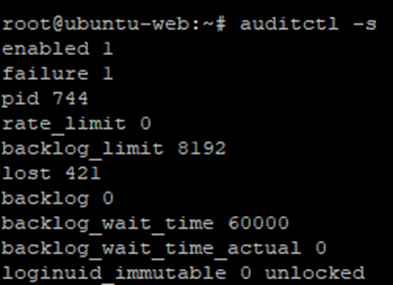
The value lost 421 means that the kernel lost 421 audit records — they were not transferred/processed auditd due to overflow. kernel audit backlog. This activity was recorded during the operating system boot. The value backlog 0 means that now the queue is empty. But during boot there was a surge of events and 421 entries were lost.
7.2. Obtaining the internal state of auditd.
The following command is used to obtain the daemon's internal metrics:
auditctl --signal stateAfter running it, the daemon writes information about its state to a file:
/run/audit/auditd.stateYou can view the file with the command:
cat /run/audit/auditd.stateExample contents:
audit version = 4.0.5
current time = 06/02/25 20:21:31
process priority = -4
writing to logs = yes
current log size = 2423 KiB
max log size = 8192 KiB
logs detected last rotate/shift = 0
space left on partition = yes
Logging partition free space 45565 MiB
space_left setting 75 MiB
admin_space_left setting 50 MiB
logging suspended = no
file system space action performed = no
admin space action performed = no
disk error detected = no
Number of active plugins = 1
current plugin queue depth = 0
max plugin queue depth used = 5
plugin queue size = 2000
plugin queue overflow detected = no
plugin queueing suspended = no
listening for network connections = no
glibc arena (total memory) is: 388 KiB, was: 388 KiB
glibc uordblks (in use memory) is: 92 KiB, was: 90 KiB
glibc fordblks (total free space) is: 295 KiB, was: 297 KiB
From this data you can assess:
- whether logging is occurring;
- whether logging is paused;
- current and maximum journal size;
- available free space;
- actions taken when space is low;
- presence of filesystem errors;
- number of active plugins;
- current and maximum plugin queue occupancy;
- presence of queue overflow;
- process memory usage.
Starting with audit-4.0.5 you can configure periodic updating of the status file with the parameter report_interval in /etc/audit/auditd.conf. This allows using the file for regular collection of monitoring metrics.
7.3. Main control metrics.
When monitoring the audit subsystem, attention should be paid to the following values:
| Metric | Purpose | Normal state |
|---|---|---|
enabled | Audit subsystem operating mode | 1 or 2 |
lost | Number of lost records | 0 |
backlog | Current number of records in the kernel queue | Significantly less than backlog_limit |
backlog_limit | Maximum queue size | Matches the load |
writing to logs | Is journal writing being performed | yes |
logging suspended | Is writing suspended | no |
disk error detected | Has a write error been detected | no |
plugin queue overflow detected | Is plugin queue overflow detected? | no |
plugin queueing suspended | Is transfer to plugins suspended? | no |
The value enabled is interpreted as follows:
0— audit is disabled;1— audit enabled; configuration can be modified;2— audit enabled in immutable mode; changes to rules are possible only after a system reboot.
7.4. Basic functionality check.
The basic check can be performed using the following commands:
systemctl status auditd --no-pager
auditctl -s
auditctl -l
ausearch -m DAEMON_START,DAEMON_END,DAEMON_ABORT,DAEMON_CONFIG -i
df -h /var/log/audit
Additionally, you can check the latest log entries:
tail -n 50 /var/log/audit/audit.logThe check is considered successful if:
- the daemon
auditdis running; - the audit subsystem is enabled;
- rules are loaded;
- the value
lostdoes not increase; - the queue
backlogis not approachingbacklog_limit; - logging is not suspended;
- no disk errors;
- plugin queues are not overflowing;
- there is enough free space on the filesystem.
8. Final verification checklist
After installation or configuration changes, it is recommended to check the following sequentially:
- the status of the service
auditd; - the status of the kernel audit subsystem;
- the list of loaded rules;
- creation of a test event;
- the event appearing in
/var/log/audit/audit.log; - search for the event using
ausearch; - no lost events;
- disk space status;
- kernel queue status;
- status of plugin queues.
Important. The list of rules
auditd, actually loaded into the kernel and applied at the moment, can be displayed with the commandauditctl -l.Note that the list of loaded rules may differ from the contents of the rule files
auditdFor example, a common set of rules may contain rules intended only for certain operating systems, distributions, or configurations. If the corresponding files, directories, system calls, or other objects are missing on a particular system, such rules may fail to load with an error.Behavior when an error occurs is determined by the parameter
-f(failure mode) at the beginning of the rules. When using-f 1the loading error of an individual rule is logged, however processing of subsequent rules continues. Thus, an unsupported or inapplicable rule may be skipped, and the remaining correct rules loaded.If the mode
-f 1is not set and the rule loading tool stops processing when an error occurs, rules located after the erroneous rule may remain unloaded. Therefore after loading a set of rules it is recommended to verify the actually applied configuration usingauditctl -l.
Example of creating and searching for a test event:
touch /tmp/audit-test-file
auditctl -w /tmp/audit-test-file -p wa -k audit_test
echo test >> /tmp/audit-test-file
ausearch -k audit_test -i
auditctl -W /tmp/audit-test-file -k audit_test
rm /tmp/audit-test-file
Expected result:
- the command to add the rule completes without error;
- modifying the file creates an audit event;
ausearchfinds an event with the keyaudit_test;- the event contains information about the user, process, and the modified file;
- the temporary rule is successfully removed after the verification is completed.
Note. A temporary rule added via
auditctl, is effective until its manual removal, a system reboot, or reloading the permanent set of rules.
References:
GitHub - linux-audit/audit-userspace: Linux audit userspace repository · GitHub